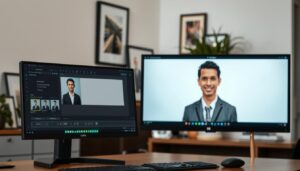
A professional video meeting begins before anyone speaks. The camera turns on, a face appears, and the room behind that person immediately becomes part of the visual introduction.
For job seekers, remote employees, consultants and business owners, that background can influence how prepared, approachable or credible they appear.
On September 21, 2026, Zoom published an update to its Meetings platform that expanded the virtual backgrounds available to users. The release introduced three new background categories—Indoors, Adventure and Artistic—while retaining five legacy stock backgrounds, custom uploads and administrator-provided options.
Zoom also enhanced its AI-generated background tools, making it easier to create customized scenes without manually finding and uploading photographs.
The changes, documented in Zoom’s September 2026 product updates, reflect a broader shift in professional video communication: people now have more control over the environments they present to colleagues, clients and potential employers.
But greater customization raises an important question.
Does a carefully designed Zoom background actually make someone look more professional, or can it create distractions that undermine the impression they want to make?
Research suggests that backgrounds can influence first impressions. However, the most effective choice is not necessarily the most elaborate, expensive-looking or visually impressive scene.
What Zoom Changed in September 2026
Zoom’s September 21 release notes, associated with Zoom Workplace app updates scheduled for September 17, introduced a refreshed virtual background library.
The new collection includes three categories designed for different visual preferences and meeting environments.
Indoors offers interior-inspired scenes that can provide a familiar, structured setting for professional conversations.
Adventure emphasizes destinations and environments outside conventional office spaces, offering a more expressive visual alternative.
Artistic introduces creative imagery that allows participants to experiment with visual personality and atmosphere.
Zoom confirmed that the five older stock backgrounds, custom backgrounds and company-administered options remain available. The company also indicated that the new backgrounds would roll out gradually rather than appear simultaneously for every user.
The update goes beyond adding more pictures.
Zoom expanded AI background generation with a more prominent generation option, ready-made scene choices and additional controls for describing a desired environment. Users can select a scene such as a home office, coffee shop or tropical beach, or provide their own instructions.
An optional style selector also allows users to influence the appearance of the generated image.
These changes make background customization more accessible, particularly for people who do not have a dedicated office or an ideal physical space for video calls.
Yet the ability to generate an attractive environment does not automatically make that environment suitable for a professional meeting.
A tropical destination might work well during an informal team conversation but feel distracting during a formal interview.
An artistic backdrop could reinforce the identity of a designer or creative professional while competing with the speaker during a financial presentation.
The relevant question is not whether the background looks appealing.
It is whether the background supports the purpose of the conversation.
Why Video Backgrounds Influence First Impressions
There is research supporting the idea that video backgrounds influence how people are perceived.
On September 27, 2023, researchers Abi Cook, Meg Thompson and Paddy Ross of Durham University’s Department of Psychology published a study in PLOS ONE titled Virtual First Impressions: Zoom Backgrounds Affect Judgements of Trust and Competence.
The researchers examined whether different backgrounds changed viewers’ perceptions of the same individuals.
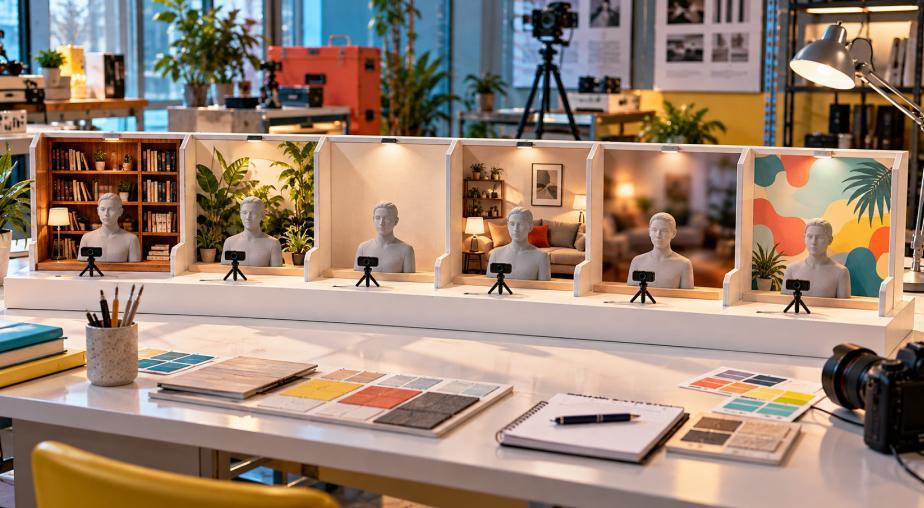
The study involved 167 participants, who evaluated 72 facial images presented against six background types.
Those backgrounds included a living room, a blurred living room, a bookcase, houseplants, a blank wall and a novelty image.
Participants rated the faces on perceived trustworthiness and competence using a seven-point scale.
The Durham University virtual first-impressions study found that backgrounds featuring plants and bookshelves generally received higher ratings for both characteristics.
Living-room and novelty backgrounds tended to receive lower ratings.
The findings suggest that the environment surrounding a face can influence an initial judgment even when viewers are primarily evaluating the person.
However, the study has important limitations.
It measured impressions of still images rather than actual job performance, hiring decisions or long-term professional relationships. The facial stimuli also came from a limited set of white adult faces, which restricts how broadly the results can be generalized.
The research was published in 2023 and did not test Zoom’s September 2026 background collection.
Nevertheless, it offers a useful starting point for understanding why background selection deserves attention.
What the Research Says About Bookshelves, Plants and Novelty Backgrounds
The Durham University study provides more specific findings than the familiar advice to keep a video background clean.
Researchers found measurable differences in perceived competence depending on the background.
| Background Type | Average Perceived Competence | General Finding |
|---|---|---|
| Bookcase | 4.96 out of 7 | Among the highest-rated |
| Plants | 4.90 out of 7 | Among the highest-rated |
| Blank wall | 4.85 out of 7 | Among the highest-rated |
| Blurred living room | 4.65 out of 7 | Intermediate rating |
| Living room | 4.41 out of 7 | Lower rating |
| Novelty background | 4.34 out of 7 | Among the lowest-rated |
Source: Cook, Thompson and Ross, PLOS ONE, September 2023. These are experimental impression ratings, not measures of actual professional competence.
The differences are meaningful within the study’s experimental design, but they should not be interpreted as universal rules.
A bookshelf does not make someone more knowledgeable.
A plant does not demonstrate that someone is trustworthy.
A plain wall does not prove that someone is competent.
The findings describe how participants responded to visual cues, not whether their judgments were accurate.
That distinction matters because professional-image advice can easily reinforce stereotypes.
People should not have to purchase decorative books or imitate a particular office aesthetic to demonstrate professional ability.
The practical lesson is simpler: familiar, visually orderly backgrounds may help viewers focus on the speaker without introducing competing visual information.
A Virtual Office Is Not Automatically More Professional
Zoom’s expanded background library gives users more opportunities to display sophisticated interiors.
But an impressive-looking virtual office can introduce its own problems.
Imagine a remote employee sitting in a modest apartment while appearing on camera against an elaborate executive boardroom overlooking a city skyline.
The background might initially look polished.
However, the visual mismatch can become distracting if the lighting, camera perspective or scale does not correspond with the person in the foreground.
The viewer may notice the artificial setting before paying attention to the conversation.
This is particularly relevant when backgrounds include architectural details that create strong perspective lines.
If a virtual window appears to be several feet behind the speaker but the subject’s lighting does not match the apparent environment, the image can feel visually inconsistent.
An ordinary room with good lighting may look more credible than an elaborate digital office.
That does not mean virtual offices should be avoided.
A neutral, well-composed interior can provide an effective professional backdrop, especially when the user’s physical environment is distracting or unsuitable.
The important consideration is whether the scene feels visually coherent and appropriate for the meeting.
Professional presentation benefits from consistency, not necessarily luxury.
Should You Blur Your Zoom Background Instead?
Background blur remains one of the most practical options for people working from shared spaces, bedrooms or busy home environments.
Unlike a replacement background, blur preserves the general shapes and lighting of the actual room while reducing visible details.
That can help protect privacy.
Family photographs, household objects and other personal information become less recognizable, allowing the speaker to maintain some separation between home and work.
Blur can also reduce distractions without introducing an entirely fictional environment.
However, it is not a perfect solution.
Strongly blurred objects may still create recognizable shapes. A bright window or large television behind the speaker can remain visually distracting even when the details are softened.
Blur also depends on the device’s ability to separate the person from the background.
If the effect struggles to identify hair, shoulders or moving hands, the image may flicker or produce unnatural edges.
Zoom’s virtual background guidance recommends good lighting and a suitable camera to improve the separation between the subject and the replacement background.
For professional meetings, blur is often a reasonable compromise when the real room is not suitable for display.
It should be treated as a privacy and presentation tool rather than a substitute for thoughtful camera placement.
AI-Generated Backgrounds Make Authenticity More Complicated
Zoom’s enhanced AI background tools introduce another dimension to professional presentation.
A person can now describe a preferred environment and generate an image that matches a desired aesthetic.
This creates practical opportunities.
A consultant who frequently works from different locations may want a consistent background for client meetings.
A creative professional may prefer an environment that reflects their work without exposing their home.
A remote employee may need to hide a shared living space that cannot be rearranged before every call.
These are reasonable uses of virtual backgrounds.
The challenge appears when the generated environment communicates something misleading.
A fictional executive suite might imply that someone occupies a particular corporate position or works in an office they do not actually have.

An invented conference room containing company branding could create confusion about organizational affiliation.
An AI-generated interior might also introduce unrealistic furniture, distorted architectural details or visual elements that change unpredictably between versions.
Those problems are not unique to artificial intelligence. Traditional photographic backgrounds can also create misleading impressions.
AI simply makes it easier to produce elaborate environments.
For professional use, a restrained scene generally provides more flexibility than a highly specific fictional location.
Neutral interiors, subtle architectural backgrounds and uncomplicated color schemes can support the speaker without making unnecessary claims about their workplace.
The strongest AI-generated background is not necessarily the one that looks most impressive.
It is the one that viewers barely need to think about.
Lighting and Camera Position Matter More Than Decorative Details
A carefully chosen background cannot compensate for poor lighting or an uncomfortable camera angle.
If a person sits with a bright window directly behind them, the camera may expose for the window and leave their face too dark.
If the camera is positioned far below eye level, the resulting perspective may be distracting regardless of what appears behind the subject.
Similarly, a virtual background can look convincing when the person remains still but reveal imperfect edges when they move.
Zoom’s video interview preparation guide recommends using a professional, distraction-free background, placing the camera at an appropriate height and arranging light so that the face is clearly visible.
These fundamentals are often more important than selecting a decorative scene.
A practical setup begins with the face.
Position the camera close to eye level and far enough away to create a comfortable head-and-shoulders composition.
Place the main light source in front of the subject or slightly to one side. Natural window light can work well when it is not excessively harsh.
Avoid placing the brightest part of the room directly behind the head.
Leave some space between the subject and the physical background when possible. That separation can make a real environment appear more organized and may improve digital background effects.
Finally, inspect the image at the size other participants are likely to see it.
A detailed background may look attractive in a large preview window but become cluttered when reduced to a small video tile.
The Best Zoom Background Depends on the Meeting
There is no single background that works equally well for every professional situation.
A job interview, an internal brainstorming session and a client presentation involve different expectations.
For a formal job interview, a neutral wall, tidy real workspace or restrained virtual interior is usually a sensible choice.
The background should avoid competing with facial expressions and verbal responses.
For client meetings, visual consistency may be more important.
A professional who regularly appears on video can benefit from using the same simple background, lighting arrangement and camera framing. Familiarity can help create a recognizable visual presence across repeated interactions.
For creative presentations, an artistic background may be appropriate when it genuinely supports the speaker’s work.
An illustrator, designer or creative director might reasonably choose a more expressive setting than someone conducting a formal compliance meeting.
However, artistic backgrounds should still preserve enough visual simplicity to keep attention on the person speaking.
For informal team meetings, a wider range of backgrounds may be acceptable.
An outdoor scene or playful image can contribute to workplace culture when the meeting is casual and participants share the same expectations.
The context matters more than the background category.
Your Clothing and Background Need to Work Together
Virtual background selection is also a clothing and color-coordination issue.
A person wearing a dark navy shirt against a nearly black background may lose visual separation between their shoulders and the environment.
Someone wearing a green top in front of a green screen may experience segmentation problems.
Highly patterned clothing can also compete with a detailed virtual scene.
The goal is not to create a perfectly coordinated outfit and background.
It is to maintain enough contrast for the person to remain visually distinct.
Solid colors often work well on camera because they reduce visual competition.
However, the best color depends on skin tone, lighting, background brightness and personal preference.
A pale blouse may stand out against a dark interior, while a deeper color can provide contrast against a light wall.
The same principle applies to professional headshots, where clothing, background and lighting work together to support the subject.
As discussed in Finest Image’s guide to authentic professional headshots, effective visual presentation should preserve recognizability rather than manufacture a different identity.
A video background should follow that principle.
It should support the person viewers are meeting, not become a more elaborate identity than the person themselves.
How to Test Your Zoom Background Before an Important Meeting
The easiest way to evaluate a virtual background is to test it under realistic conditions rather than relying on how it appears in a static preview.
Before an interview, client presentation or important video meeting, use this short process:
- Choose two or three background options. Compare a tidy real environment, background blur and one restrained virtual scene.
- Check your face first. Confirm that lighting and camera position keep your expression clearly visible.
- Move naturally. Turn your head, gesture and shift slightly to see whether digital edges flicker or disappear.
- Review clothing contrast. Make sure your shoulders, hair and clothing remain visually separate from the background.
- Inspect the complete frame. Look for distracting objects, unrealistic perspective, private information or visual details that compete with your face.
A short recording can make these differences easier to notice.
It is also worth checking the setup at the same time of day as the actual meeting, since natural lighting can change significantly between morning and evening.
The purpose is not to achieve a studio-perfect appearance.
It is to create a stable, clear image that allows the conversation to proceed without unnecessary visual distractions.
Your Background Should Support Your Professional Identity, Not Replace It
The September 2026 Zoom update makes video backgrounds more customizable, accessible and visually expressive.
That is useful for people who work remotely, share living spaces or want greater control over their on-camera appearance.
But the expansion also makes background selection a more deliberate part of professional image management.
The Durham University research shows that visual environments can influence judgments of trustworthiness and competence. It does not show that a particular background makes someone more qualified, nor does it establish that Zoom’s new scenes will improve hiring or business outcomes.
The difference is important.
A professional background can help reduce distractions, protect privacy and establish an appropriate atmosphere.
It cannot replace preparation, communication, experience or professional conduct.
For most formal meetings, the safest approach is still a visually simple background that allows the speaker to remain the focus.
That may be a real wall, a tidy workspace, a softly blurred room or a restrained virtual interior.
More expressive scenes have their place when the context supports them.
The most useful question to ask before joining a meeting is not, “Does this background make me look successful?”
It is, “Does this background help people focus on what I have to say?”
When the answer is yes, the background is doing its job.